



What is LockBit Ransomware? Everything You Need to Know About the LockBit Virus
LockBit is one of the most talked-about ransomware families in recent years. It renders systems unusable by encrypting files
and then demands a ransom in exchange for a "decryption key." Moreover, in most scenarios,
it doesn't just encrypt; it also threatens to leak and publish the data to increase pressure.
In this guide, you will find clear information about what LockBit is, how it spreads, which file extensions it uses, typical ransom notes,
prevention methods, and the correct steps to take in the event of an incident.
What is LockBit ransomware?
LockBit ransomware is an advanced ransomware that encrypts files on computer and server systems using cryptographic methods
and demands a ransom in exchange for decryption.
. Unlike classic malware, its targets are mostly corporate networks: file servers, virtual
infrastructures, backup systems, NAS devices, and critical business applications may be priority targets.
The main reason LockBit attacks are so effective is that they proceed like an operation that affects the entire network, rather than "just breaking a single computer and leaving it at that."
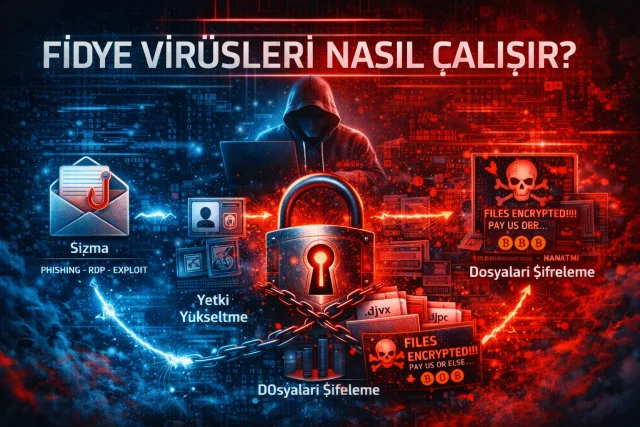
operating like an operation that affects the entire network. Stages such as intrusion, privilege escalation, lateral movement within the network, disabling backups
, and finally mass encryption. Therefore, LockBit should not be viewed merely as a "virus,"
but rather as a planned cyber attack most of the time.
How does LockBit work?
LockBit's operating principle is based on the attacker gaining persistence in the system after infiltrating the network and gaining access to as many
files. The goal is to maximize the impact of the encryption and increase the likelihood of a ransom payment.
A typical LockBit case involves the following stages:
Typical attack flow
Why does it have such a rapid impact?
LockBit is optimized to speed up the file encryption process as much as possible. This means it can take effect in a short time, even with large data volumes
. In corporate systems, it is often noticed not as a "nasty surprise," but rather as
suddenly everything stops: shared folders won't open, files appear corrupted,
and business applications cannot access data files.
How does LockBit spread?
Although LockBit's infection (initial access) methods vary, the most common channels are well-known in practice.
While there are simple examples such as "I opened a single file and it happened," in corporate cases, weak access policies,
outdated systems, and credential leaks play a critical role.
Most common infection methods
Phishing emails
Emails containing fake invoice/quote files, shipping notifications, "account verification" requests, etc.
Malicious attachments or links are used. Office files containing macros or malicious archives (ZIP/RAR) are common in this method.
RDP (Remote Desktop) vulnerabilities
Internet-facing RDP services can be compromised through weak password usage or brute force attacks.
Once an attacker gains administrative access, the likelihood of rapid propagation within the network increases.
Software vulnerabilities and lack of updates
Delays in operating system patches, vulnerabilities in VPN devices, outdated web applications or
plugins that are not updated create opportunities for groups such as LockBit. In particular, the "let's not touch it, it's working"
approach increases the risk of attack.
Crack/keygen and pirated software sources
Unreliable sources where unlicensed software is downloaded are a frequently used vector for installing malware such as LockBit.
Using cracked software, especially on work computers, directly weakens corporate security.
Note
In corporate cases, the most critical vulnerability is often the "human + process" combination: weak password policies,
lack of multi-factor authentication (MFA), and insufficient monitoring (log/EDR) make LockBit's job easier.
What are LockBit file extensions?
LockBit usually adds specific extensions to the end of the files it encrypts. These extensions may vary depending on the version used and the attacker's
configuration. While the extension change alone is not a definitive diagnosis, it is a strong indicator for quick identification at the time of the incident.
Common extensions
.lockbit.lockbit2.lockbit3.abcd (in some variants).HLJkNskOq)Example
When the
report.xlsx file is encrypted, it may become: report.xlsx.lockbitTip
In addition to the extension, changes in the file size, inability to open the file, "corrupted file" error, and the presence of ransom notes in the same folder
can make the diagnosis more reliable.
What does a LockBit ransom note look like?
After encryption is complete, LockBit usually leaves one or more "ransom notes" on the system.
These notes contain the attacker's instructions, communication channel, and payment process. The victim is usually directed to a panel via TOR.
to a panel.
Common ransom note files
Restore-My-Files.txtREADME.txtlockbit_readme.txtWhat does a typical ransom note say?
What is double extortion?
One of the things that makes LockBit more dangerous is that attackers don't just stop at encryption.
In many scenarios, the attackers first examine the system, export valuable data (accounting files, customer data, contracts,
email archives, etc.), and then initiates encryption.
In this case, the ransom is demanded not only to "unlock the files" but also to "prevent the data from being published."
This approach puts operational, reputational, and legal pressure on the organization.
What is LockBit 3.0 (LockBit Black)?
There are various versions and variants of the LockBit family. The version known as "LockBit 3.0 / Black"
is associated with more advanced techniques and more aggressive operations. Methods to bypass defense products
and stronger automation can be observed.
Key risks
Ways to protect against LockBit
There is no such thing as "perfect protection" against ransomware attacks, but with the right architecture and disciplined operations, the risk can be significantly reduced.
The most effective approach against LockBit is not just installing antivirus software, but implementing the backup + access control + monitoring
together.
The most effective security measures
3-2-1 backup strategy
Back up using the logic of at least 3 copies, 2 different media, and 1 offline copy. Use versioning
and immutability.
Email security and user awareness
Keep macros disabled by default, avoid opening suspicious attachments, conduct phishing awareness training, and implement email security layers
(spam/attachment filtering) reduce the likelihood of attacks.
Strengthening RDP/VPN access
Disable internet-facing RDP if possible. If required, only allow access via VPN, IP restrictions, strong passwords, and
MFA.
Patch management
Operating systems, VPN devices, web applications, and plugins should be updated regularly. The "update postponed"
is one of the biggest opportunities for ransomware.
EDR + Centralized Log Monitoring
EDR solutions are effective at detecting suspicious behavior. In addition, centralized logging and alert mechanisms
(such as SIEM) provide an opportunity for early intervention.
What should be done if LockBit infects your system?
Panicking and taking the wrong steps at the moment of the incident can increase the damage. However, taking the right steps will stop the spread and increase the chances of data recovery.
The goal here should be "quick response + evidence preservation + secure recovery."
Quick action list
Important warning
Cleaning the malware does not automatically restore files. If there is no decryption key or reliable solution,
it may be difficult to open the files. Therefore, a backup and intervention plan is critical.
Is there a LockBit decryptor? Can the files be restored?
It would be incorrect to say that there is a single universal decryptor that "always works" for LockBit. Opportunities may arise in some cases due to law enforcement
operations, flawed encryption implementations, or solutions targeting older variants may present opportunities.
However, in most cases, the most reliable way to recover is the clean system + solid backup approach.
If your organization has been affected, instead of rushing to "run every decryptor I find," it is safer to make an accurate diagnosis using sample files, ransom notes,
extensions, and logs to make an accurate diagnosis and verify from reliable sources.
Frequently asked questions
What is LockBit ransomware?
LockBit is a family of ransomware that encrypts files, blocks access, and demands a ransom to unlock them. In many cases
it also threatens to leak and publish the data, applying double extortion.
What happens if you get the LockBit virus?
Files are encrypted, extensions may change, a ransom note is left, and business continuity in systems may be disrupted.
In corporate scenarios, file servers and shared folders may also be affected.
What are LockBit extensions?
The most common ones are
.lockbit, .lockbit2, .lockbit3, and different/random extensions in some variants. The extension, ransom note, and the inability to open files should be evaluated together.
Should the LockBit ransom be paid?
Paying the ransom does not guarantee that files will be unlocked or that data will be deleted. It may also encourage further attacks.
The safest approach is to restore from backups and patch security vulnerabilities.
Can LockBit files be recovered?
It is not always possible. Solutions may be available in some specific cases; however, the most reliable recovery method is to restore from secure and isolated backups
. It is important to preserve evidence and logs during the incident response process.
How can I protect myself from a LockBit attack?
Offline/versioned backups, MFA, RDP/VPN hardening, regular updates, email security, and monitoring layers such as EDR/SIEM
significantly reduce the risk of LockBit.
![What is Ransomware? How Does It Work, How Does It Spread, and How Can You Protect Yourself? [2026 Guide]](/media/resize?path=storage%2Fuploads%2F253876fe-7603-4408-8773-193c119057ad.webp&w=640)